 PropTrading
Download Copy Trade for Tradovate
The Chrome Web Store listing is in review. Until it's live, you can install the extension directly from this download. It takes about a minute.
Works in Google Chrome on desktop, and in other Chromium browsers such as Brave and Edge.
How to install
Unzip the download
Right-click copy-trade-for-tradovate-1.0.0.zip and choose Extract All (Windows) or double-click it (Mac). Keep the folder somewhere permanent, such as Documents. Chrome loads the extension from this folder, so don't delete it.
Open the extensions page
Type chrome://extensions in the address bar and press Enter. In Brave it's brave://extensions, and in Edge edge://extensions.

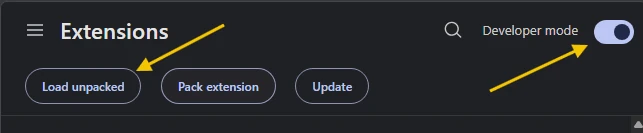
Turn on Developer mode, then click "Load unpacked"
Flip the Developer mode switch in the top-right corner. A Load unpacked button appears on the left. Click it and select the unzipped folder, the one that contains manifest.json.
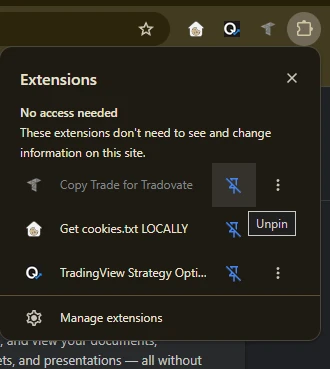
Pin it and open Tradovate
Click the puzzle-piece icon in the toolbar and click the pin next to Copy Trade for Tradovate. Then open trader.tradovate.com, log in, and click the extension's icon to open its side panel.
Good to know: extensions installed this way don't update themselves. When the Chrome Web Store version is live, remove this copy on chrome://extensions and install it from the store to get automatic updates. Chrome may also show a reminder about developer mode extensions. That's expected for a direct install.
New to the extension? See how it works or ask in our Discord.